


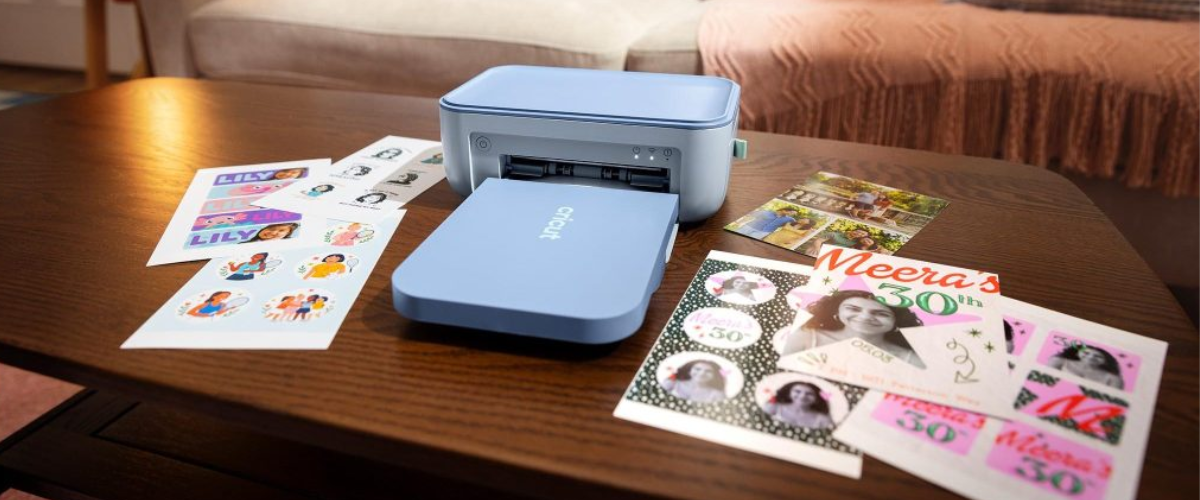
Compact dye-sublimation machines enable creators to produce high-quality stickers, photos and labels with built-in lamination
Easily bring your camera roll to life with the brand-new Cricut StickerPix™ machines. Create custom, pro-quality stickers, labels, photo prints, cards, and invitations — at home, in minutes.
What is Cricut StickerPix?
Cricut StickerPix is our new line of sticker machines. There are two machines: a sticker and photo printer + cutter, Cricut StickerPix Print + Cut, and a sticker and photo printer, Cricut StickerPix Print. The machines are both compact and come in cute new colors with an all-in-one design that means no extra steps or tools needed.
Print shop quality at home
With Cricut StickerPix machines, expect high-resolution detail and ultra-vivid color in every print. No more driving to the shop to pick up photos or ordering custom stickers in bulk. Create personalized pro-quality stickers, photo prints, and more from the convenience of your home. Because great ideas shouldn’t have to wait.
Dye-sublimation printing
Both sticker machines use dye-sublimation technology, which uses heat to transfer dye directly onto the material instead of spraying on ink droplets like traditional printers. The result is smooth, continuous color that’s especially well suited to photos.
Lamination process
Both sticker machines laminate to add a layer of protection for prints that are water-, scratch-, and fade-resistant.
Effortlessly transform your photos with Design Space® software
Go from an idea to a full sticker sheet with one-click photo transformations and editable templates in Design Space®.* Our all-new software experience allows you to apply unique effects and styles to your photos, plus use editable templates for easy and custom designs. Simply grab photos from your camera roll and turn everyday moments into something you can hold.
Cricut StickerPix Print™ vs. Cricut StickerPix Print + Cut™
Cricut StickerPix Print + Cut™
Cricut StickerPix Print + Cut is an all-in-one sticker and photo printer with precision-cutting capabilities. It’s the larger of the two Cricut StickerPix machines and is compatible with 4 in x 7 in Sticker Sheets and 4 in x 6 in Photo Paper.
Cricut StickerPix Print™
Cricut StickerPix Print works similarly to Cricut StickerPix Print + Cut. However, instead of precision-cutting your stickers, it uses pre-cut sticker sheets.
This machine is compatible with 1.5 in Circle Pre-cut Sticker Sheets, 1 in x 2.6 in Rectangle Pre-cut Sticker Sheets, 1.5 in Square Pre-cut Sticker Sheets, and 4 in x 6 in Photo Paper.
Cricut StickerPix Print is also the smaller of the Cricut StickerPix machines, measuring 7.8 in x 5 in x 3.5 in, versus Cricut StickerPix Print + Cut’s 8 in x 11.3 in x 4.1 in size.
What’s the difference between making stickers with Cricut StickerPix machines vs Cricut cutting machines?
While you can make custom stickers with Cricut StickerPix machines and select Cricut cutting machines, there are three main differences in the process and output.
Home inkjet printer
Cricut cutting machines do not have print functionality and require an at-home inkjet printer. Cricut StickerPix machines use ink cartridges built into the machine and do not need an at-home inkjet printer.
Die-cut vs kiss-cut stickers
Cricut StickerPix machines can only make kiss-cut custom stickers for easy peeling, while Cricut cutting machines can do either die-cut or kiss-cut.
Laminate sheets vs laminate coating
Cricut StickerPix machines have laminate coating already built into the printing process.
Cricut cutting machines, on the other hand, use laminate sheets that must be manually applied by the user to achieve a water-resistant coating. These laminate sheets also come in fun styles to add different effects to your stickers, such as a holographic finish.